Key Takeaways
Starlink can provide internet access in locations where campground Wi-Fi or cellular service is limited, but connectivity still depends on service availability and a sufficiently clear view of the sky.
RV owners should choose their hardware and service plan carefully. Portability, data allowances, in-motion use, power requirements, and geographic coverage can differ by product and subscription.
A permanent roof mount can reduce setup time at each stop, while a portable system allows the terminal to be moved away from trees or other obstructions.
Roof penetrations, cable routing, weather sealing, and electrical integration require careful planning. An installation mistake may lead to water intrusion, cable damage, or unreliable power.
The Starlink app can help users examine a proposed installation area for obstructions. Roof equipment, trees, buildings, and terrain may interrupt the connection.
Starlink should not be treated as a guaranteed replacement for every other connection method. Some RV travelers maintain cellular service or another backup for locations where satellite connectivity is unavailable.
Service plans, hardware specifications, and permitted uses may change. Owners should verify current information directly with Starlink before purchasing equipment or arranging an installation.
Understand the System Before Choosing a Mount
Connectivity Still Depends on the Surroundings
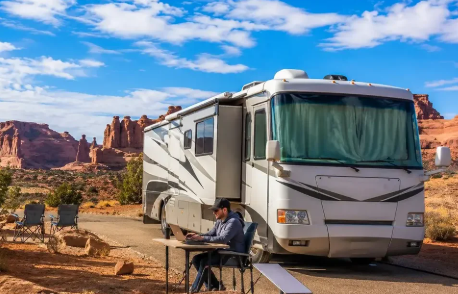
Starlink communicates with satellites moving across the sky. The terminal therefore needs a broad view overhead, not simply an open area in one direction.
Trees, buildings, cliffs, and equipment mounted on the RV roof can obstruct that view. Even intermittent obstructions may affect video calls, remote work, online gaming, or other activities that depend on a stable connection.
Starlink provides the following placement guidance:
“Each Starlink should have a clear view of the sky 20° elevation above the horizon, 360° around the azimuth.”
Starlink Help Center
The Starlink app includes an obstruction-checking tool that can help evaluate a proposed location. Owners should scan the area where the terminal will actually be used. A clear roof at home does not guarantee an unobstructed campsite beneath dense trees.
Satellite internet may be helpful in areas without usable cellular coverage, but “remote” does not automatically mean “connected.” Service availability, subscription terms, obstructions, network demand, and weather can all influence performance.
Match the Hardware and Plan to the Way You Travel
Starlink offers different hardware configurations. The appropriate choice depends on whether the system will remain on the RV, be deployed on the ground, or be packed away between uses.
A smaller portable unit may suit travelers who prioritize easy storage and modest power use. A permanently mounted terminal may appeal to owners who do not want to deploy equipment at every stop. Hardware dimensions, environmental ratings, power requirements, and network equipment vary by model.
In-motion use requires particular attention. Not every terminal, mounting method, or service plan is approved for use while a vehicle is moving. Equipment designed for stationary deployment should not be assumed safe or authorized for highway operation.
Service plans can also differ in their data terms and geographic permissions. Some plans may include defined data allowances, restrictions, or charges for additional usage. Before ordering, an RV owner should confirm:
- Whether the plan supports the intended travel area
- Whether stationary or in-motion use is permitted
- How data is allocated
- Whether service can be placed in standby
- Which terminal models are compatible
- What charges apply when changing plans
Plan names and terms can change, so current information from the customer’s Starlink account is more dependable than an older article or video.
Plan the Mounting, Cabling, and Power
Compare Permanent and Portable Configurations
A portable setup allows the terminal to be placed away from the RV. This can be useful when the vehicle is parked under trees but an open area is available nearby. It also avoids a permanent roof penetration.
Portable equipment must be deployed and stored at each stop. The owner should protect it from vehicles, foot traffic, standing water, and theft. Cables should not create a tripping hazard or be crushed by slide-outs, doors, or tires.
A permanent mount keeps the terminal attached to the RV and can shorten setup time. Its location must account for roof vents, air conditioners, antennas, solar panels, awnings, and the path of moving components.
RV owners seeking assistance with an rv starlink installation can review Coach Specialists’ permanent and portable mounting options. The company’s listed services include roof mounting, cable routing, custom brackets, power integration, and optional internal network setup.
A professional service does not guarantee internet performance. Its role is to plan and complete the physical integration while accounting for the RV’s construction and the selected Starlink equipment.
Protect the Roof and Cable Entry Points
An RV roof is a weather barrier, so every attachment and cable opening deserves careful attention. Mounting hardware must suit the roof material and underlying structure.
The installer should confirm where framing, wiring, ducts, and plumbing are located before drilling. A fastener placed without that information may damage a concealed component or fail to provide adequate support.
Cable entry points should be positioned to limit water exposure and cable strain. Sharp bends, compressed seals, and unsupported cable sections can cause damage over time. Sealants and hardware must be compatible with the RV’s roofing material.
Coach Specialists describes one feature of its permanent installations as:
“Weatherproof hardware and sealed cable routing.”
Coach Specialists of Texas
Even a properly sealed installation needs periodic inspection. Sunlight, vibration, temperature changes, tree contact, and roof maintenance can affect sealants and mounting components.
Owners should also verify whether an installation could affect an RV warranty, roof warranty, or insurance coverage. Written confirmation may be useful when the vehicle is relatively new.
Approach Installation as an RV Modification
Map the Physical Installation Before Drilling
Installation should begin with a layout, not a drill. The proposed plan should identify the terminal location, mounting hardware, cable route, interior entry point, power source, and router position.
The terminal should be far enough from other roof equipment to reduce physical interference. Its placement must also allow required vents, air conditioners, solar panels, and antennas to function properly.
A permanent installation commonly involves the following stages:
- Confirming the exact Starlink hardware
- Checking the proposed location for obstructions
- Examining the roof and supporting structure
- Planning the cable path and interior entry point
- Installing the mount with compatible hardware
- Sealing all attachment and entry areas
- Connecting the power and network equipment
- Testing the system before travel
The mounting instructions supplied for the exact terminal and accessory should be followed. Instructions for one Starlink generation may not apply to another.
A DIY installation may be practical for an owner with suitable tools and RV repair experience. Anyone uncertain about the roof structure, weather sealing, or electrical work should consider qualified assistance.
Calculate Power and Network Requirements
Starlink equipment requires a stable power source. Actual consumption depends on the model, network activity, environmental conditions, and whether features such as snow melt are operating.
Travelers who camp without utility hookups should consider how the system will affect battery capacity. Running Starlink for several hours may influence the sizing of batteries, solar panels, generators, inverters, or DC power equipment.
Some current Starlink accessories allow compatible hardware to operate directly from a DC source. Compatibility must be confirmed for the exact terminal and power supply. Improvised wiring or an incorrectly sized circuit may damage equipment or create an electrical hazard.
The router location also affects Wi-Fi performance inside the RV. Metal walls, appliances, mirrors, cabinets, and distance can weaken the signal. A location near the center of the living area may provide better coverage than a hidden exterior compartment.
Large coaches or mobile work units may require additional network equipment. Owners should determine whether their installation needs Ethernet connectivity, a separate access point, or integration with an existing router.
Any permanent electrical connection should include appropriate circuit protection. Wiring should be secured away from heat sources, moving parts, and sharp edges.
See also: Emerging Travel Trends Shaping Professional Journeys to Chennai
Use and Maintain the System Responsibly
Test the Installation Before a Long Trip
Testing should begin while the RV is parked in an accessible location. The owner can verify that the terminal starts correctly, connects to the network, and provides Wi-Fi coverage in the intended areas.
The first test should also look for physical concerns. Cables should not interfere with slide-outs, storage doors, awnings, or roof equipment. Interior cable passages should be protected where they cross panels or compartments.
After the RV has been driven, the mount and cable routing should be inspected again. Road vibration may reveal movement or strain that was not noticeable during the initial installation.
Internet performance should be tested under realistic conditions. A single speed test does not establish how the system will perform at every destination. It may be more helpful to test video calling, document access, streaming, or other activities the owner expects to use.
Travelers who depend on internet access for work or safety-related communication should maintain a backup plan. A cellular hotspot, campground connection, or secondary carrier may be useful when obstructions or service limitations affect Starlink.
Inspect Hardware and Review Service Changes
Exterior hardware should be included in routine roof inspections. Owners can check for loose fasteners, deteriorating sealant, cable abrasion, impact damage, and movement around brackets.
The terminal may need cleaning when dirt or debris accumulates. Owners should follow the manufacturer’s instructions and avoid chemicals or tools that could damage the surface.
Before driving, portable terminals should be disconnected and stored securely unless the hardware, mount, and service are specifically approved for in-motion operation. A temporary ground stand should never be left deployed when the RV moves.
Software updates are typically handled through the Starlink system, but owners should monitor the app for alerts and service information. Plan terms may also change over time.
Seasonal travelers should review the current standby or pausing options in their accounts. The availability, cost, and functionality of standby service may depend on the subscription.
FAQ
Does Starlink work at every RV campsite?
No. Performance depends on coverage, network availability, the selected plan, weather, and the terminal’s view of the sky. Trees and other obstructions can interrupt service.
Is a permanent roof mount better than a portable setup?
Neither option is universally better. A permanent mount reduces repeated setup, while a portable terminal can be moved to avoid obstructions. The best choice depends on travel habits and the RV’s design.
Can any Starlink terminal be used while the RV is moving?
No. In-motion use depends on the terminal, mounting method, service plan, and current Starlink terms. Owners should verify all requirements before operating the system on the road.
How long does an RV Starlink installation take?
Installation time varies according to the RV, hardware, mounting method, cable route, power integration, and network requirements. A time estimate should be provided after the installer examines the vehicle and equipment.
Does Starlink always provide unlimited data?
No. Data terms vary by plan. Some options may have defined allowances or additional charges. Customers should review the current terms displayed in their Starlink accounts.
Can the service be paused when the RV is not being used?
Some plans may offer standby or pausing options. Availability and pricing can change, so subscribers should confirm the current conditions through their accounts.
Will Starlink replace a cellular hotspot?
It may replace cellular service for some uses and locations, but not every situation. Cellular service can remain useful where trees block the sky or where setting up a satellite terminal is impractical.
Does professional installation guarantee faster internet?
No. Professional installation can provide secure mounting, planned cable routing, weather sealing, and proper power integration. Connection performance still depends on factors outside the installer’s control.
Useful Resources
- Starlink Official Website
- Starlink Help Center
- Starlink Roam
- Starlink Specifications
- Starlink Installation Videos
- Starlink In-Motion Use Guidance
- Starlink Standard Accessories Guide
- RV Industry Association
- Federal Communications Commission Broadband Resources